
Bike Transformation AI Video Prompt | Google Flow Tutorial
Create a motorcycle-to-bicycle-to-ram AI comedy in Google Flow. Download matching photos, copy three scene prompts and edit the Hindi reaction video.
AI-generated edited example. Results vary by generation.
Read the full prompt
BIKE TRANSFORMATION — THREE SEPARATE SCENE PROMPTS Use the matching revised photos linked in the guide. Generate separately in portrait 9:16. Scene 1: motorcycle Start + bicycle End. Scene 2: bicycle Start + ram End. Scene 3: ram Start, leave End empty. These are the prompts used for the revised example; review and editing are still necessary. SCENE-01-BIKE-TO-BICYCLE Photorealistic vertical 9:16, 8-second single shot. Animate the supplied Start and End frames: the same fictional Indian man in navy overshirt and woman in sage jacket, on the same street. Start on motorcycle, end on bicycle. Keep their faces, clothes, normal human anatomy, framing, camera side and RIGHTWARD heading identical. Both mouths start naturally closed. At 0.5 seconds the man has ONE quick involuntary natural sneeze: tiny nasal breath, eyes briefly shut, chin and shoulders dip slightly for less than half a second, then relaxed recovery. It is a realistic nonverbal sneeze, NOT spoken words, NOT a prolonged ah-choo or yawn. At that sneeze, a very small dust wisp accompanies the motorcycle changing into the ordinary bicycle shown in the End photo. Finish change by 1.7 seconds, retain seated positions with a small believable balance adjustment. From 1.7 seconds through the end, the pair stays naturally on the bicycle in slow traffic; no repeated sneeze, no further transformation. Surrounding vehicles drift FORWARD to screen right and away, same direction as bicycle. Camera stays fixed on the same side, no orbit, no reverse, no turn toward camera, no cut or zoom. Audio: ONE short natural human sneeze synced with head reflex, soft street ambience and subtle transformation rustle. No speech, no music, no vocalized words. Realistic skin, fabric, wheel contact and daylight. No extra foreground people, black bands, text or social-media overlays. SCENE-02-BICYCLE-TO-RAM Photorealistic vertical 9:16, 8-second single shot. Use the supplied Start bicycle and End white-ram images. Same fictional man in navy/beige and woman in sage/black, exact faces and clothes. Stable left-side three-quarter view, all subjects point to SCREEN RIGHT and slightly away. At 0.45 seconds the man gives ONE short involuntary realistic sneeze: momentary eye closure, tiny forward chin/shoulder reflex and immediate recovery. This is a nonverbal bodily sneeze, not a spoken ah-choo, shouting or open-mouth yawn. Exactly on the sneeze, bicycle becomes the large healthy white ram in the End frame with a small localized dust wisp. Complete transition by 1.7 seconds. Riders remain stable, seated naturally, hands settle onto wool. Ram is already facing right, same heading as the former bicycle and surrounding traffic. After the transformation, remain nearly stationary in the slow traffic with subtle natural life movement; no leap, spin or reverse, no walking toward camera. Background white cars, auto and bus continue to the right and away in same carriageway. Keep one camera axis, no orbit or cuts. Audio: ONE crisp natural human sneeze with brief breath, gentle street ambience, small soft transformation sound. No dialogue, no music or repeated sneeze. Real fur, skin, light and grounded hooves. No bicycle remnants, no deformation, no added captions or black bands. SCENE-03-REACTION-EXIT Photorealistic 8-second 9:16 live-action comedy. Animate the supplied photo of the same fictional Indian man in navy overshirt and woman in sage jacket seated on a healthy large white ram facing screen RIGHT. Preserve both faces, clothes, same street and daylight. Critical road continuity: ram and nearby cars, auto-rickshaw and bus share ONE forward heading, SCREEN RIGHT and diagonally away. Maintain the camera on the LEFT side of that heading for the entire take; NO 180-degree camera orbit, NO turn back toward camera, NO opposing traffic in their lane. 0.15-1.65 seconds: only the woman looks briefly at the man and says in clear natural Hindi, lips synced: "अब ये क्या बना दिया?" The man listens silently. 1.8-3.2 seconds: only the man replies with a small amused smile in clear natural Hindi: "पेट्रोल तो बचेगा!" The woman listens silently. By 3.3 seconds both face ahead. From 3.3-8 seconds the ram walks then gently trots STRAIGHT FORWARD in its established rightward lane, following the white car and auto farther down the road. Its head stays ahead of its body in the direction of travel, normal alternating grounded hoof steps, riders balanced. Camera gently tracks from the same side and can fall behind into a rear three-quarter view without the ram changing heading. The rears of the cars/auto/bus stay ahead of it. All get farther away, not closer or reversed. Exactly the two dialogue lines once only, no other words, no sneeze. Audio: quiet traffic and believable hoofbeats, no music. Natural candid acting and real skin/wool/fabric. No dramatic zoom, jump cut, animal distress, black bars, social overlays or captions.
Create a short comedy in which a sneeze turns a motorcycle into a bicycle, and a second sneeze turns it into a giant white ram. This guide uses a new fictional adult couple, three matching starting photos and three separately generated video scenes. The example on this page was generated in Google Flow, then edited into a ten-second sequence. It does not use the original reference creator's face or voice.
Download the matching starting photos
Use these three images together to keep the same faces, outfits, camera position and street. Save the files before opening Flow.
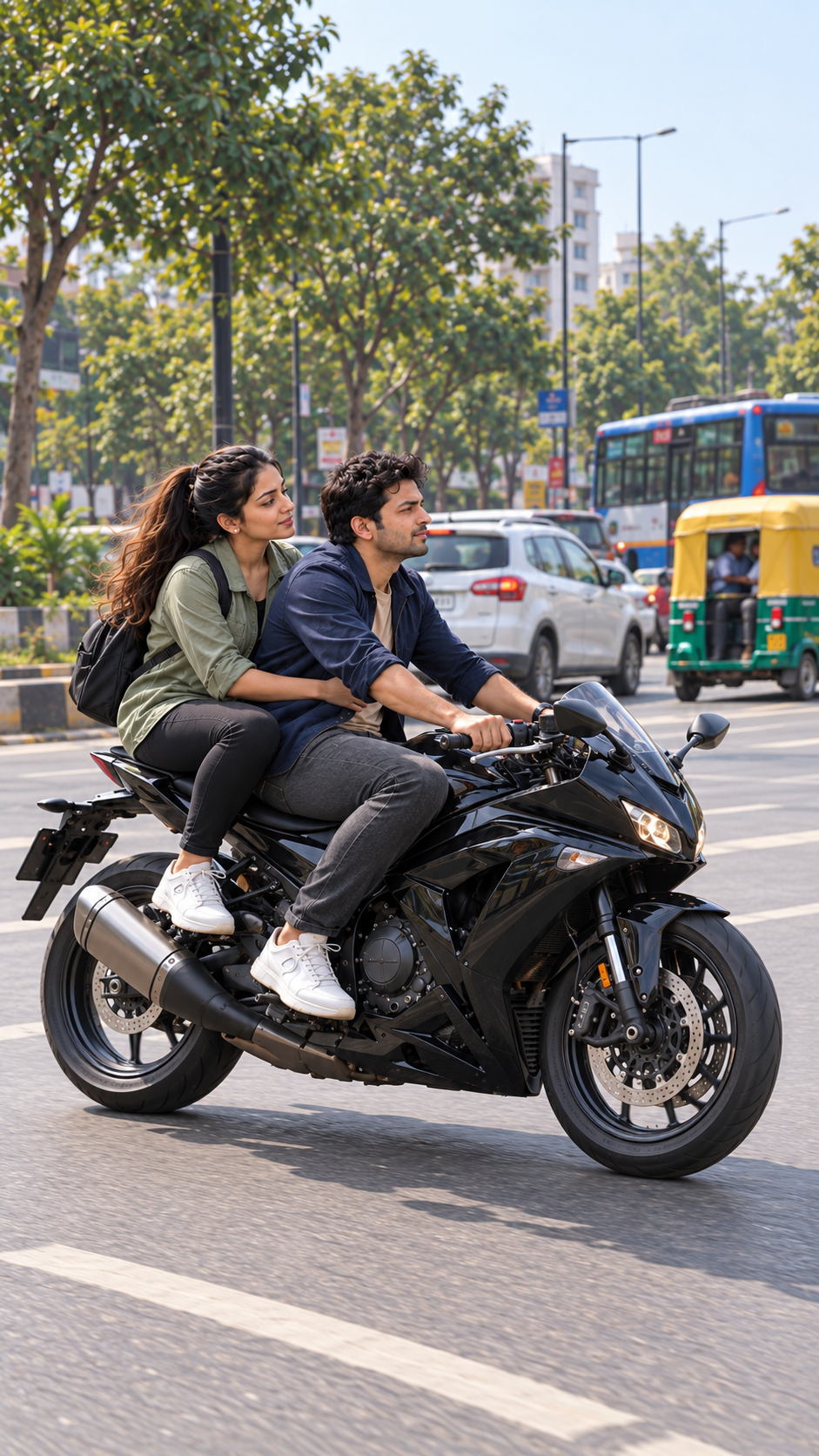
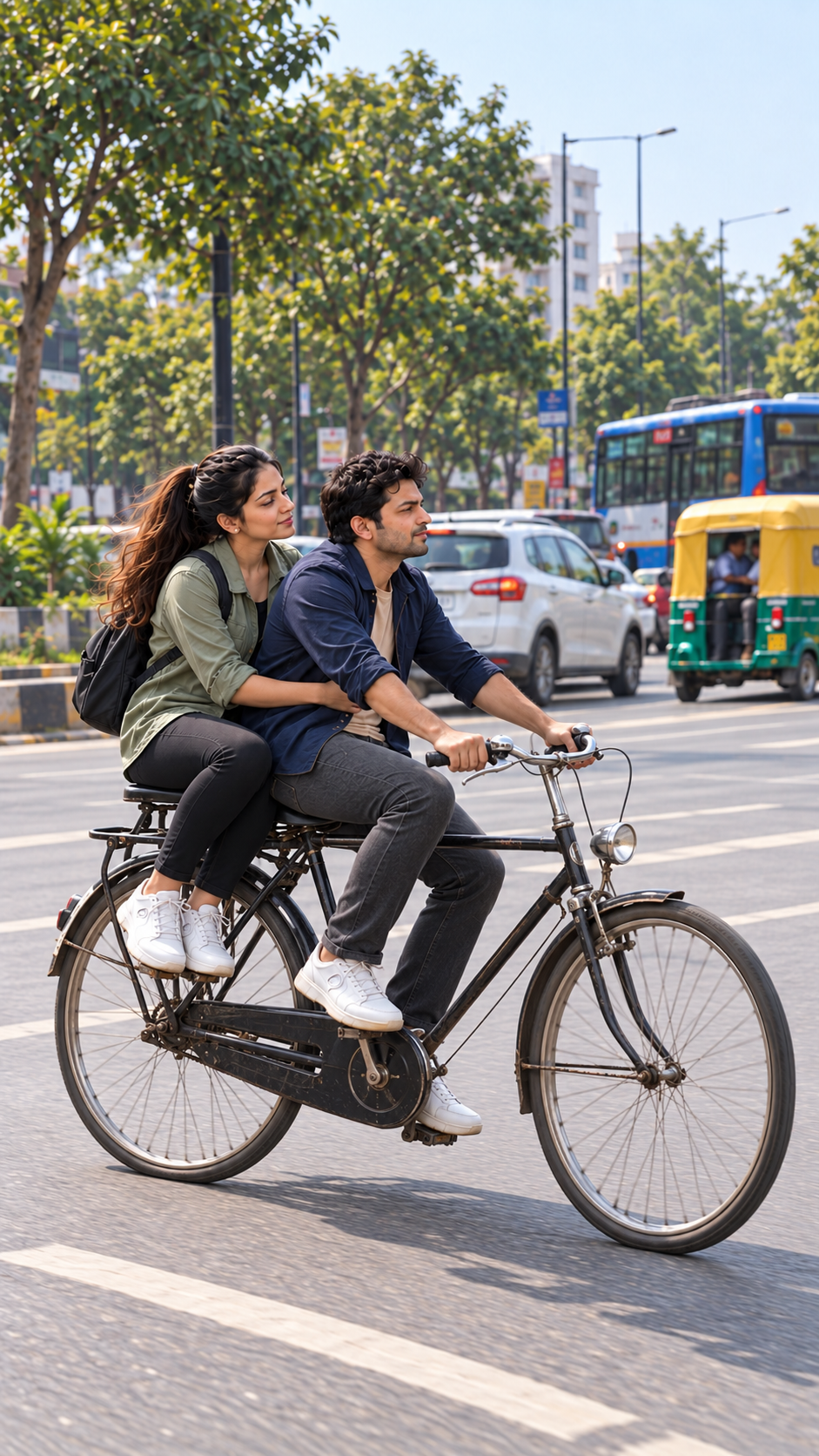
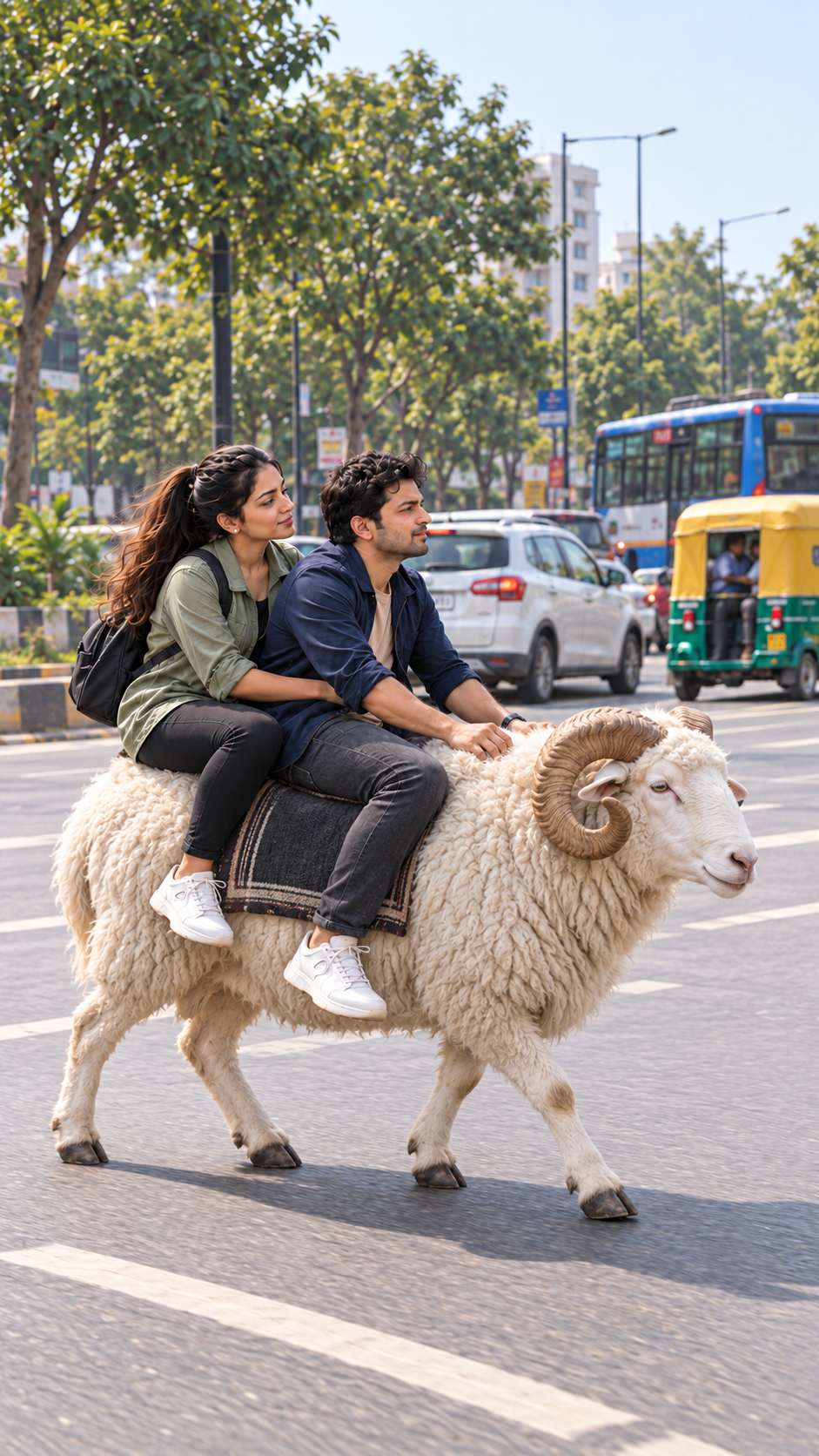
The man wears a navy jacket over a beige shirt. The woman wears a sage jacket and dark jeans. Both are fictional adults. The setting is a busy Indian road in natural daylight. The oversized ram is a fantasy comedy element; the visual treatment aims for natural skin, wool, light and shadows.
What to prepare
Open a Flow account with access to video generation and enough credits for the selected model. Available models, credit costs and controls can differ by account and can change. This example used portrait 9:16, one output per prompt and eight-second source clips. This revised example used Veo 3.1 Fast for all three scenes. The downloaded source files were 720p. The final edit can be exported at 1080 × 1920, but that does not create additional native detail.
Copy one scene prompt at a time from the prompt section. Do not paste all three scenes into a single generation. A separate generation for each transformation gives you more control over the timing, character continuity and ending.
Scene 1: motorcycle to bicycle
Choose Video, Frames and portrait 9:16. Put Photo 1 in Start and Photo 2 in End. Paste Scene 1 only. The man gives one short nonverbal sneeze, and a small dust puff covers the vehicle replacement. The riders remain recognizably the same people. The motorcycle should be completely replaced by a bicycle rather than remaining as a partial hybrid.
The prompt requests an early transformation followed by a quiet hold. After generation, watch the whole clip and trim it to the useful action. In our example, the first 2.2 seconds provide the opening sneeze, replacement and short reaction. Your result may need a different cut; use the visible action and sound rather than assuming the requested timestamps will be exact.
Scene 2: bicycle to white ram
Use Photo 2 as Start and Photo 3 as End. Paste Scene 2 only. A second short nonverbal sneeze changes the bicycle into a large white ram. Check that wheels, frame tubes and handlebars disappear. The ram needs four coherent legs, two curled horns and grounded feet. The people should adjust their balance naturally instead of turning into part of the animal.
This revised edit uses 2.2 seconds from the second generated clip. A generated moment in which the riders floated was removed with a short match cut: source 0–0.467 seconds followed by 1.4–3.133 seconds. The native sneeze audio continues across that cut. The displayed example therefore includes an editing repair; it is not an untouched generation. Leave enough time after the transformation for viewers to understand the joke. A clean cut to the next scene is usually more readable than another flash or a long transition.
Scene 3: Hindi reaction and exit
Use Photo 3 as the Start frame and leave End empty. Paste Scene 3. The woman says “अब ये क्या बना दिया?” and the man replies “पेट्रोल तो बचेगा!” The ram moves to screen right and then away from the camera while they hold on. Keep the camera on the same side of the road axis and keep the ram following the vehicles ahead. Adjacent lanes can carry opposing traffic; the ram must not enter that lane. There is no narrator in the standalone comedy.
Listen to the generated dialogue carefully. The model can repeat a line, change a word or give speech to the wrong character. In this example, the first 5.6 seconds retain the two intended lines and the forward exit. If your clip has a different error, regenerate that scene or repair the specific issue before assembling the final video.
Assemble the short video
Place the three clips in this order: motorcycle transformation, bicycle transformation, reaction and exit. Our selected lengths are 2.2 + 2.2 + 5.6 seconds, giving a ten-second edit. Keep the native sneeze and reaction audio, balance the volume between clips and use clean cuts. Avoid adding several loud whooshes over the joke. Check the edit on a phone-sized preview before exporting.
Use a full portrait canvas without the black bands in the supplied inspiration clip. Preserve the whole vehicle or animal when framing, and avoid cropping the heads or feet. The tutorial version can place the example inside the established AI Prompt King frame while retaining its own audio during the preview.
Customizing the characters
You can create your own fictional adult pair and three matching photographs. Make the first image carefully, then change only the vehicle for the second and third images. Keep identities, clothing, direction, daylight and camera distance consistent. With permitted personal photos, confirm that the tool accepts them and that you have permission to use them. Do not copy another creator's likeness or narration.
For a different language, replace only the two reaction lines and the language instruction. Keep one speaker active at a time and keep each line short. A longer script may need a longer scene and a different final edit.
Natural sneezes and forward road direction
Do not write a prolonged spoken “ah-choo” as dialogue. Request one brief involuntary sneeze with a small head and shoulder reflex, momentary eye closure and immediate recovery. Keep the first frame relaxed rather than frozen with a wide-open mouth. Preview the sound and motion together before cutting.
Use a stable left-side three-quarter camera and define screen right and away as the direction of travel in all three prompts. Match this heading in the three starting photos. Avoid a camera orbit or an unexplained reverse shot that changes the road axis. Check the animal’s head, hoof steps and the cars ahead over several seconds; one still frame cannot establish travel direction.
Troubleshooting and output checks
If a bicycle wheel remains beside the ram, make the instruction to remove the entire bicycle clearer and regenerate that scene. If the faces drift, return to the matching Start and End photos. If the ram turns in an unwanted direction, shorten the usable exit or request a simpler side/rear tracking shot. If dialogue repeats, trim after the intended line when the visual result permits it.
These prompts guide generation; they do not guarantee identical motion, perfect anatomy, exact timing or a viral result. Inspect the beginning, each transformation, the speakers' mouths and the final frame. Export only after the whole sequence plays cleanly with sound. Search for Bike Transformation in AI Prompt King to find this guide and its three scene prompts again.