
Ravan Vadh AI Video Prompt: Cinematic Bow and Arrow Effect
Create a cinematic Ravan Vadh AI video with a realistic warrior, a golden arrow and matching start/end frames. Includes image prompts and Google Flow steps.
AI-generated edited example. Results vary by generation.
Read the full prompt
RAVAN VADH — IMAGE AND VIDEO PROMPTS IMAGE 1 — START FRAME Create one photorealistic vertical 9:16 cinematic fantasy action photograph. Cast an original fictional adult Indian male warrior, around 30, with short wavy black hair, light stubble and a distinctive face, wearing a charcoal-black traditional warrior tunic, restrained antique-gold trim, dark trousers, practical boots and a flowing dark cape. He stands securely on a broad rooftop in the foreground-left, seen from a three-quarter side angle with his face visible. He holds a golden bow and one nocked arrow, drawing toward the right. Keep the entire bow, hands, arrow and his feet in the image with safe composition margins. Beyond the rooftop, in the middle/background-right, stands the mythological Ravana, a giant with exactly ten distinct crowned heads attached coherently to one powerful humanlike body. One dominant central face and nine additional clearly distinguishable heads, arranged without fused facial features; two natural arms, gold ceremonial armour, a dark red and gold lower garment. He towers above an imaginary modern Indian city. Preserve physical depth: the hero is human-sized near the camera, Ravana is enormous far away. Storm clouds, distant small fires, drifting dust and warm golden light create the epic setting. Add a few tiny distant civilians on safe streets, without visible injuries or prominent foreground faces. Ravana faces the hero. The bow's line of aim runs clearly from foreground-left to background-right at Ravana's breastplate. The arrow remains fully nocked; no impact yet. Realistic skin pores, fabric, gold metal reflections, smoke perspective, natural hands and believable contact shadows. Fictional cinematic mythology, not a historical photograph. No text, captions, interface, borders or black bars. Avoid extra arrows, extra arms, duplicate hero, merged heads and a plastic or illustrated appearance. PERSONAL PHOTO OPTION Replace only the hero casting paragraph with: Use the attached permitted portrait as the sole identity reference for the adult hero. Preserve the recognizable facial structure, skin tone, hairstyle and facial hair. Change the clothing to the specified warrior costume. Do not copy the portrait's background. Keep one hero. All other composition and scene requirements remain unchanged. IMAGE 2 — END FRAME Use the previously generated first image as the visual reference. Produce the final frame of that same scene in vertical 9:16. Preserve the exact same adult hero identity, costume, bow, rooftop, camera side, lens perspective, skyline, daylight direction and Ravana design. Do not invent a different location or character. The hero still stands on the same rooftop in the foreground-left, has lowered the bow, and turns his face slightly toward the camera with a restrained victorious expression. There is no arrow remaining on the bow. Far behind and to screen-right, the same ten-headed Ravana has fallen backward into the distant city space, away from the rooftop; his torso leans down and away and a billowing dust cloud obscures the lowest part of the fall. Keep the ten crowned heads coherent and attached. No blood, open wounds or bodily dismemberment. The scene is a fantasy victory tableau. Soft red flower petals drift through the foreground and background, with the hero's face unobscured. Maintain a grounded hero pose, physically credible cape folds, consistent gold armour, warm rim light and storm-cloud texture. Leave the same framing margins as the first image. Do not mirror the shot, move the hero to the other side, add captions or show a second hero. VIDEO PROMPT — USED FOR THE EIGHT-SECOND EXAMPLE Create an eight-second photorealistic vertical 9:16 fantasy action sequence connecting the supplied START and END images. They define the same hero, ten-headed Ravana, rooftop, city, lighting and camera side. Preserve the hero's identity and clothing throughout. Maintain the action axis: the hero stays on the rooftop foreground-left and fires toward Ravana in the middle/background-right. The arrow must move away from the bow toward Ravana, never toward the hero or back toward the camera. 0.0–1.8 seconds: begin with the hero already aiming. A slight breath and realistic arm tension tighten the golden bowstring. One arrow gathers restrained golden light. Ravana makes only a slow looming movement in the distance; ten distinct crowned heads stay attached to his body. 1.8–3.4 seconds: the hero releases exactly one arrow. Show a clear separation from the string and a quick continuous golden trail from left to right toward Ravana's chest armour. Hands release naturally. A subtle camera push follows the established aim without crossing the action axis or hiding the release behind a large flare. 3.4–5.8 seconds: the arrow reaches the breastplate with a brief localized golden burst and a soft expanding energy ripple. Ravana recoils once, loses his balance and falls backward away from the hero. Maintain a heavy, coherent body and attached heads; use dust to cover contact with distant structures. No graphic injury, blood or dismemberment. No repeated arrow shot or falling toward the rooftop. 5.8–8.0 seconds: return smoothly to the original rooftop composition and settle into the supplied end-frame pose. The hero lowers the bow, looks slightly toward the camera and holds a calm victory expression. Red flower petals drift as dust settles in the background. His face and costume remain stable. Use cinematic realism: photographic skin, believable metal and fabric, storm-lit smoke, consistent depth, grounded feet and plausible bow handling. Audio: original cinematic percussion and low atmospheric tension, a single bowstring release, one arrow-flight sound and one deep impact followed by settling rubble. No intelligible speech, no song lyrics, no copied recording, no repeated transition whooshes. No social-media text, interface, subtitles or black bands. Preserve source tool attribution if the host adds it. The requested timing guides the action and may need trimming after generation. AUDIO AND FINISHING The published edited example uses original cinematic percussion and separately added arrow/impact effects. The short video prompt above does not request that soundtrack. Add licensed or original sound in your editor. Inspect head count, hands and direction before publishing; exact anatomy and identity are not guaranteed.
Create a fantasy action video with a realistic warrior on a rooftop, a gigantic ten-headed Ravana beyond the city, and a golden arrow that leads into a dramatic victory scene. This workflow uses two matching images and one motion prompt. The first image establishes the action; the second fixes the ending so the hero, costume and location remain easier to follow.
The preview is an original eight-second AI-generated example made in Google Flow with a fictional adult warrior. It uses start and end frames, with cinematic sound added during editing. It is a fantasy demonstration. The crown row is not an exact ten-head reconstruction in every frame; use the review checks below before publishing your own result.
What you need
Prepare a new fictional adult character or a photograph you are permitted to use. You also need an image-generation tool, such as Gemini, and a Google Flow account with a video model that supports the frames workflow. The prompts below are separated into the first image, final image and movement between them.
The AI Prompt King demonstration uses an original fictional hero. It does not use the inspiration creator's face, voice or finished video as its generated example. You can adapt the hero identity while retaining the action and composition.
Step 1: Create the first image
Open your image-generation chat. For a personal version, attach your permitted portrait and use the personal-photo casting option in Image Prompt 1. For a fictional version, use the original-character casting instructions. Ask for a portrait 9:16 image with the hero in the foreground-left and Ravana in the background-right.
Check the image before moving on. The bow, hands and arrow must be coherent, the hero's face should be visible and the ten crowned heads should be distinguishable. The arrow should still be on the bow. Keep enough space around the hero's hands and feet so the video does not begin with a cropped action.
Step 2: Make the ending in the same chat
Use Image Prompt 2 with the first generated image as a reference. Keep the same face, clothing, rooftop, camera angle and skyline. Change the action: the hero lowers the bow, Ravana has fallen backward in the distance, and red petals drift through the frame.
Download both images. Compare them side by side. If the hero changes clothes, Ravana moves to the opposite side or the camera jumps to a different building, fix the final image first. A motion prompt cannot reliably repair two contradictory scene layouts.
Step 3: Use start and end frames in Flow
In Flow's video workflow, choose Frames. Put the aiming image in the start slot and the victory image in the end slot. Set portrait 9:16 where available, select a compatible model and paste only the video prompt. Google's help page documents using starting and ending images with a prompt describing the action between them. Available features can vary by account and location. Google Flow: create videos.
The prompt targets a short action sequence: aim, release, golden-arrow impact, backward fall and a calm hero finish. Choose the available duration that fits the action. Inspect the rendered clip rather than assuming the model follows every action exactly.
Step 4: Keep the direction clear
The hero stays left and shoots right. The arrow begins at the bow, leaves it once, and reaches Ravana's breastplate. Ravana recoils away from the rooftop. Avoid mirroring either image or asking the camera to orbit around the action. Those changes can make the arrow appear to travel backward or make the target switch sides.
A brief golden impact works better than a prolonged full-screen flash when the audience needs to understand the action. Keep the fall non-graphic and use distant dust to finish it. The ending should hold the hero's expression long enough to read, without several empty seconds.
Audio and finishing
Use original cinematic sound or music you have permission to use. The example replaces generated audio with original percussion and licensed arrow/impact effects. The compact motion prompt is separate from this finishing step, so it does not promise the same soundtrack. This avoids borrowing another creator's narration. Check the generated audio for unwanted words or sudden level changes before editing.
Trim any failed frames, repeated arrow launches or unnecessary tail. Keep the whole hero and bow visible in a full portrait canvas. Exporting a lower-resolution generation at a larger size does not add native image detail. Preserve any tool attribution added by the generation host.
Final review
Watch the hero's face at the start, release and final pose; inspect the bow and fingers; count Ravana's visible heads; and follow the arrow across the scene. Check for a second hero, floating feet, drifting costumes or a fall toward the wrong side. Revise the specific failed frame or action rather than adding unrelated effects over it.
Prompt wording guides the model but does not guarantee identical motion, anatomy, face consistency or a viral result. Search for Ravan Vadh in AI Prompt King to locate this prompt package. The package includes two image prompts, a personal-photo adaptation and the video motion prompt.
Example files and tested setup
Download the start frame and download the end frame. These files contain a fictional generated character. To make a personal version, use your own permitted portrait and regenerate both images together.
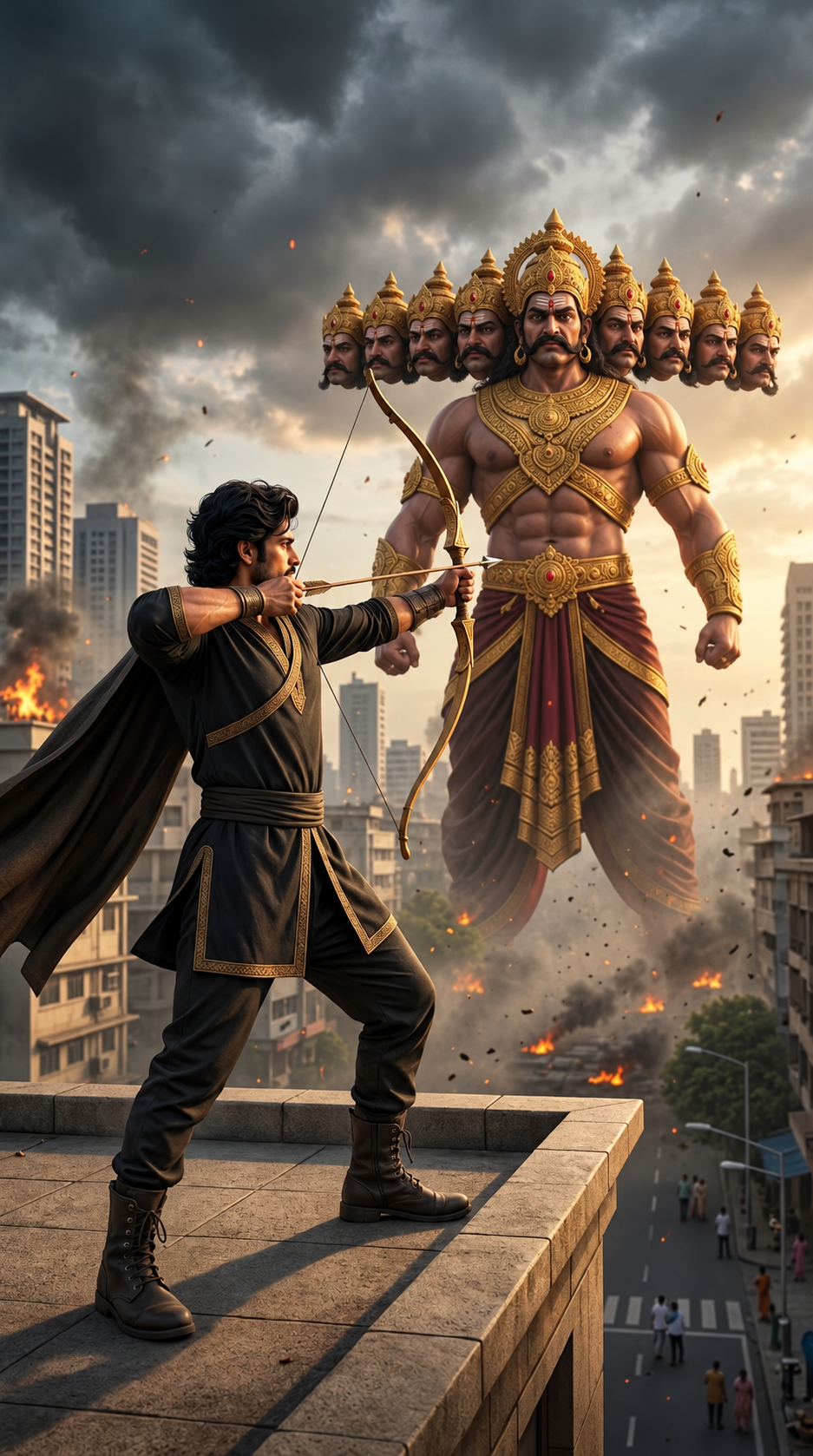
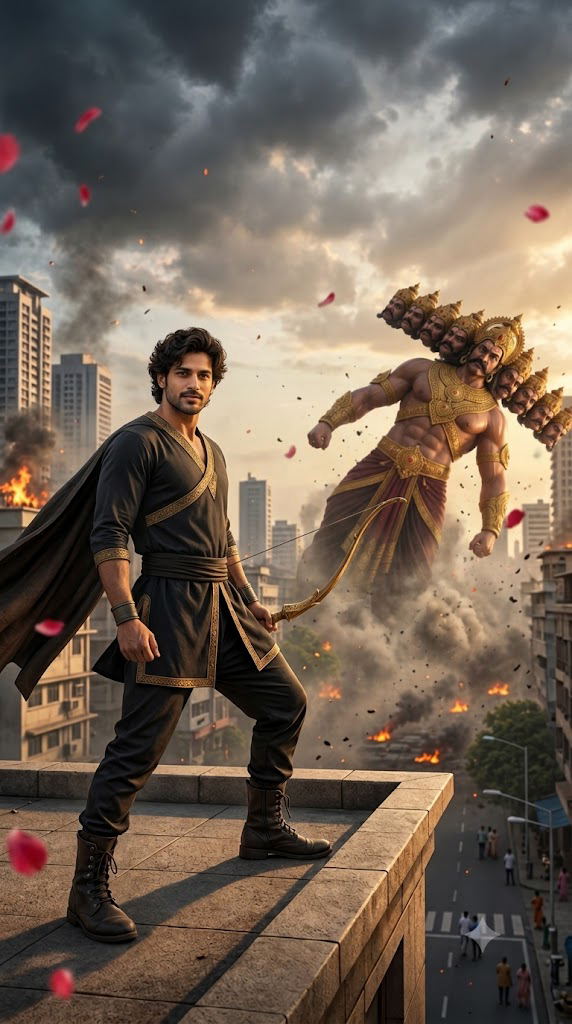
This example used Google Flow, Frames, portrait 9:16, Omni 1.1 Flash, eight seconds and native 720p. The downloaded file is 720 × 1280 at 24 fps. The tutorial export is 1080 × 1920; that export size does not turn the source into native 1080p. Model names, limits and available options can vary by account.
Gemini produced the initial and ending scene images. The start composition was additionally refined with an image editor to improve framing. The compact video prompt above is the one used for the Flow example.
For a precise recreation, compare the two frames first, then inspect the generated arrow flight, face continuity and crown count. Adjust the image or regenerate the specific failed movement before exporting.