
Slow Motion Fall AI Video Prompt for Instagram Reels
Create a viral slow-motion fall video with AI using our ready-to-use prompt. Follow the step-by-step guide to create cinematic Instagram Reels.
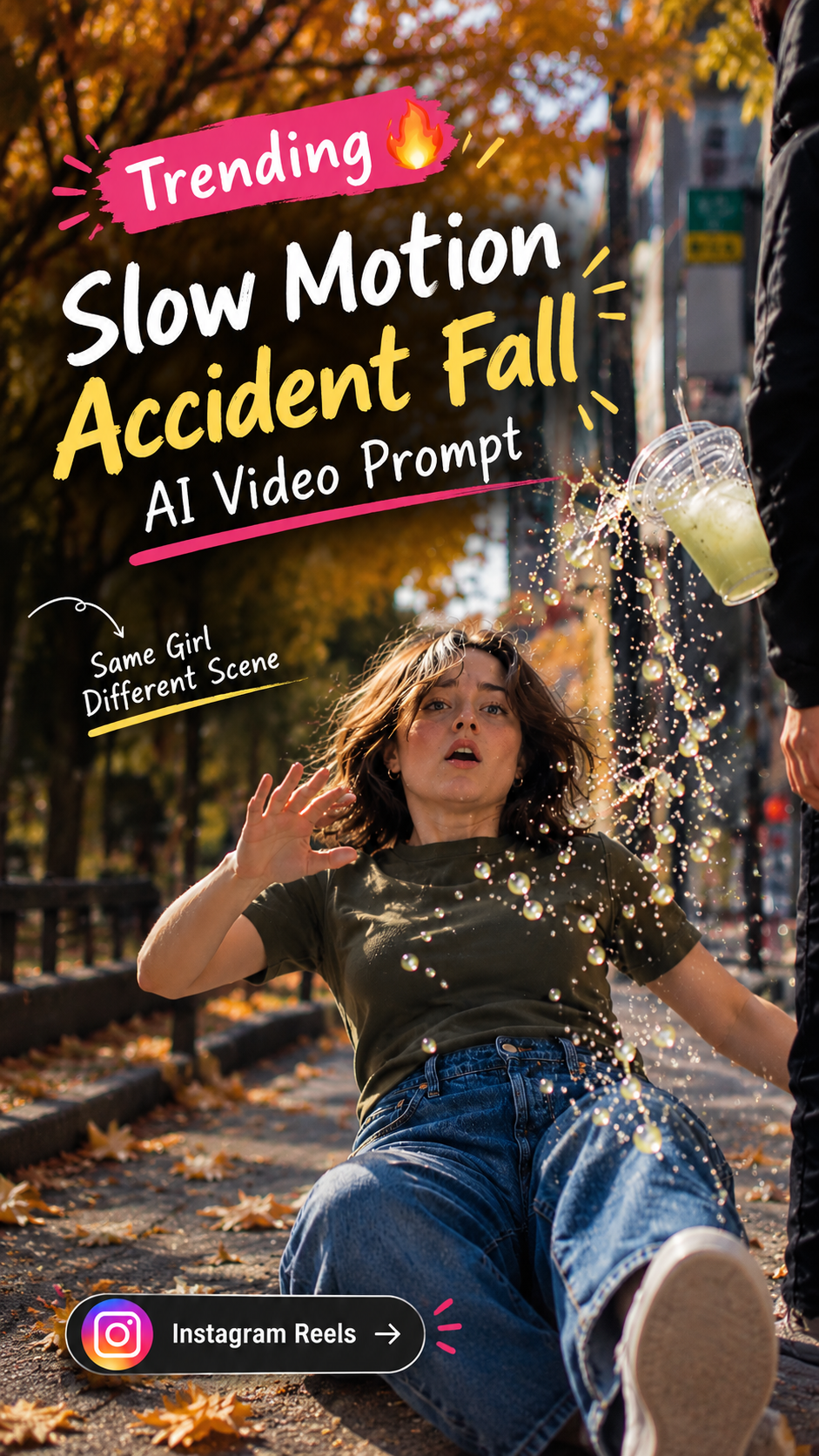
तीन सेकंड की reference झलक; यह personalized generated result नहीं है।
Read the full prompt
Create a cinematic, ultra-realistic vertical 9:16 slow-motion accident-fall video using the provided cover image as the primary visual reference and the uploaded video as a motion and pacing reference. CHARACTER CONSISTENCY: The exact same young woman from the cover image, with shoulder-length brown hair, an olive-green fitted T-shirt, blue jeans and white sneakers. Preserve her face, hairstyle, clothing, body proportions and identity throughout the entire video. SCENE 1 — NATURAL WALK (0–3 seconds): On a beautiful autumn city sidewalk covered with fallen orange leaves, the woman walks casually toward the camera while holding her smartphone and a clear plastic cup containing a pale green iced drink. Golden sunlight shines through the orange trees. The camera smoothly tracks backward, maintaining a realistic full-body composition. Her walk feels natural and relaxed. SCENE 2 — THE SUDDEN TRIP (3–5 seconds): As she takes another step, her sneaker unexpectedly catches the edge of an uneven pavement tile. Her expression changes from relaxed to surprised. Her body begins to lose balance, her arms instinctively reach outward, and the smartphone and drink leave her hands. The cup tilts as the liquid begins spilling into the air. SCENE 3 — EXTREME SLOW MOTION (5–9 seconds): Time suddenly slows dramatically to ultra-smooth cinematic slow motion. The woman falls backward toward the pavement in a physically believable, controlled motion. Her hair floats naturally, her arms extend outward, and her legs move forward with realistic momentum. The smartphone rotates through the air, the transparent cup spins slowly, and thousands of tiny drink droplets remain suspended in the golden sunlight. Every object follows believable gravity and momentum. Capture individual droplets, realistic liquid physics, subtle fabric movement and detailed facial expressions. SCENE 4 — FLOATING OBJECT CLOSE-UPS (9–12 seconds): Show a series of elegant cinematic close-up shots of the objects suspended in midair: the smartphone rotating against a blurred orange autumn background, the transparent cup spinning with pale green liquid and ice cubes floating around it, and sparkling droplets catching the sunlight. Use shallow depth of field, creamy bokeh and detailed macro photography. Keep the same autumn colour palette and lighting throughout. Each shot should feel like premium slow-motion commercial footage. SCENE 5 — FINAL FALL (12–15 seconds): Return to the wide street-level shot. The woman completes her fall onto the pavement in a non-graphic, physically believable way. The cup lands nearby, the remaining liquid splashes across the ground, and the phone settles on the pavement. Fallen leaves move slightly from the impact. End with a cinematic close-up of the spilled drink, scattered droplets and the woman recovering her balance. CAMERA AND VISUAL STYLE: Photorealistic live-action cinematography, vertical 9:16 framing, warm autumn colours, natural sunlight, shallow depth of field, smooth camera tracking, dramatic speed ramping from normal speed to extreme slow motion, realistic motion blur, crisp suspended liquid droplets, high dynamic range and premium commercial-film quality. AUDIO: Natural footsteps, soft autumn street ambience, a subtle shoe scrape during the trip, a brief cinematic whoosh as the objects enter slow motion, and realistic liquid splashing on impact. No dialogue, no narration and no music unless added during editing. STRICT CONTINUITY: Maintain the exact same woman, outfit, hairstyle, street location, autumn trees, lighting and object appearance. The fall must happen as one continuous physical event. No sudden outfit changes, no face morphing, no duplicate phones or cups, no extra fingers, no impossible body movements, no graphic injuries, no artificial cartoon effects, no text, no subtitles, no logos and no watermark.
# How to Create a Slow Motion Accident Fall AI Video
Create a cinematic, slow-motion falling effect inspired by trending Instagram Reels using AI video generation tools. This effect shows a girl walking on an autumn street before suddenly losing her balance, while her phone, drink, and flying liquid droplets move through the air in dramatic slow motion.
Follow this step-by-step guide to create your own version.
Step 1: Prepare Your Reference Image
Start with a clear reference image showing the girl, her outfit, and the autumn street environment.
For the best results:
- Use a high-quality image with the character clearly visible.
- Choose a vertical 9:16 composition.
- Keep the outfit simple and easy for the AI to reproduce.
- Make sure the face, hair, smartphone, and drink are clearly visible.
- Use an original or properly licensed image.
Upload this image to an AI video generator that supports image-to-video generation.
Step 2: Choose an AI Video Generator
Select an AI video tool that supports image-to-video generation, motion control, or reference images.
Look for these features:
- Image-to-video generation
- Custom video prompts
- Adjustable duration and aspect ratio
- Character or reference-image consistency
- Slow-motion-friendly motion generation
Feature availability, pricing, and generation limits vary by tool.
Step 3: Add the Video Generation Prompt
Copy the AI video prompt provided on this page and paste it into the generator's prompt field.
The prompt should describe the complete action in chronological order:
- The girl walks naturally along an autumn street.
- Her foot unexpectedly catches on uneven pavement.
- She loses balance and her smartphone and drink leave her hands.
- The action transitions into dramatic slow motion.
- The phone, cup, and individual liquid droplets rotate through the air.
- The girl completes the fall, and the objects land on the pavement.
Describe the camera movement, lighting, environment, character appearance, and physical motion clearly.
Step 4: Select the Video Settings
Recommended starting settings:
- **Aspect ratio:** 9:16 vertical
- **Duration:** 10–15 seconds, if supported
- **Visual style:** Realistic cinematic footage
- **Camera movement:** Smooth tracking followed by stable slow-motion shots
- **Motion intensity:** Moderate to high during the fall
- **Reference image:** Enabled, if available
If your tool has a separate motion-reference option, use it only when you have a suitable reference clip and the tool supports that feature.
Step 5: Generate the Video in Separate Clips
If the generator struggles with the complete sequence, create three shorter clips.
**Clip 1 — Walking and Losing Balance**
Show the girl walking naturally before she unexpectedly trips. Focus on realistic movement and a clear change in facial expression.
**Clip 2 — Slow-Motion Objects**
Show the phone rotating, the plastic cup spinning, and the liquid droplets suspended in the sunlight. Use close-up shots and shallow depth of field.
**Clip 3 — Final Fall and Landing**
Show the girl completing the fall in a non-graphic way. The cup lands nearby, the drink splashes onto the pavement, and the phone settles on the ground.
Use the same character reference, outfit description, and environment for every clip.
Step 6: Improve the Slow-Motion Effect
The most visually satisfying part of this video is the moment when the drink and other objects become suspended in the air.
To improve this effect:
- Ask for clearly visible individual liquid droplets.
- Use a sudden speed ramp from normal speed to slow motion.
- Keep the background softly blurred during close-ups.
- Use natural sunlight to highlight the droplets.
- Avoid excessive camera shake during the slow-motion sequence.
If the AI does not generate convincing slow motion, use a video editor to slow down the best sections. Optical-flow or frame-interpolation features can help smooth the footage, although results depend on the original clip.
Step 7: Edit and Export the Final Reel
Import the generated clips into your preferred video editor.
Arrange them in the correct order, trim unwanted frames, and add a smooth transition between normal-speed walking and slow motion.
You can add:
- Subtle cinematic sound effects
- Footsteps and street ambience
- A liquid splash sound
- Background music that fits the mood
Export the finished video in vertical 9:16 format at a resolution supported by your editor and social platform.
Tips for Better Results
- Keep the character's face and clothing consistent.
- Avoid changing the location between clips.
- Do not ask for too many different camera movements in one shot.
- Generate multiple versions of difficult scenes and select the most realistic result.
- Use close-up shots for liquid droplets and wider shots for the fall.
- Review the entire video for visual glitches before publishing.
Final Result
With a good reference image, a detailed prompt, and careful editing, you can create a cinematic slow-motion fall video suitable for Instagram Reels, YouTube Shorts, and other vertical video platforms.